
跳转到主要内容
一个基于模型上下文协议(MCP)的服务器实现,集成了 Firecrawl,提供网页抓取能力。我们的 MCP 服务器开源,代码托管在 GitHub

功能

  • 网站抓取、爬行与发现
  • 搜索与内容提取
  • 深度研究与批量抓取
  • 支持云端与自托管
  • 支持 HTTP 流式传输

安装

你可以使用我们的托管远程 URL,或在本地运行服务器。请前往 https://firecrawl.dev/app/api-keys 获取你的 API 密钥。

远程托管 URL

https://mcp.firecrawl.dev/{FIRECRAWL_API_KEY}/v2/mcp

使用 npx 运行

env FIRECRAWL_API_KEY=fc-YOUR_API_KEY npx -y firecrawl-mcp

手动安装

npm install -g firecrawl-mcp

在 Cursor 上运行

在 Cursor 中添加 Firecrawl MCP 服务器

手动安装

配置 Cursor 🖥️ 注意:需要 Cursor 版本 0.45.6 及以上 如需获取最新配置说明,请参阅 Cursor 官方关于配置 模型上下文协议(MCP)服务器的文档: Cursor MCP 服务器配置指南 在 Cursor v0.48.6 中配置 Firecrawl MCP
  1. 打开 Cursor 设置
  2. 前往 Features > MCP Servers
  3. 点击 “+ Add new global MCP server”
  4. 输入以下代码:
    {
      "mcpServers": {
        "firecrawl-mcp": {
          "command": "npx",
          "args": ["-y", "firecrawl-mcp"],
          "env": {
            "FIRECRAWL_API_KEY": "YOUR-API-KEY"
          }
        }
      }
    }
    
在 Cursor v0.45.6 中配置 Firecrawl MCP
  1. 打开 Cursor 设置
  2. 前往 Features > MCP Servers
  3. 点击 “+ Add New MCP Server”
  4. 输入以下内容:
    • Name: “firecrawl-mcp”(或你偏好的名称)
    • Type: “command”
    • Command: env FIRECRAWL_API_KEY=your-api-key npx -y firecrawl-mcp
如果你使用的是 Windows 并遇到问题,尝试:cmd /c "set FIRECRAWL_API_KEY=your-api-key && npx -y firecrawl-mcp"
your-api-key 替换为你的 Firecrawl API 密钥。如果你还没有,可以创建账号并从 https://www.firecrawl.dev/app/api-keys 获取。 添加后,刷新 MCP 服务器列表以查看新工具。Composer 代理会在合适的情况下自动使用 Firecrawl MCP,但你也可以通过描述你的网页抓取需求来显式请求。通过 Command+L(Mac)打开 Composer,在提交按钮旁选择 “Agent”,然后输入你的查询。

在 Windsurf 上运行

将以下内容添加到你的 ./codeium/windsurf/model_config.json
{
  "mcpServers": {
    "mcp-server-firecrawl": {
      "command": "npx",
      "args": ["-y", "firecrawl-mcp"],
      "env": {
        "FIRECRAWL_API_KEY": "你的 API 密钥"
      }
    }
  }
}

以流式 HTTP 模式运行

要在本地使用流式 HTTP 传输运行服务器,而不是使用默认的 stdio 传输:
env HTTP_STREAMABLE_SERVER=true FIRECRAWL_API_KEY=fc-YOUR_API_KEY npx -y firecrawl-mcp
使用以下 URL: http://localhost:3000/v2/mcphttps://mcp.firecrawl.dev/{FIRECRAWL_API_KEY}/v2/mcp

通过 Smithery 安装(旧版)

要通过 Smithery 自动为 Claude Desktop 安装 Firecrawl:
npx -y @smithery/cli install @mendableai/mcp-server-firecrawl --client claude

在 VS Code 中运行

若要一键安装,请点击下方任一安装按钮… 在 VS Code 中使用 NPX 安装 在 VS Code Insiders 中使用 NPX 安装 若要手动安装,请将以下 JSON 块添加到 VS Code 的用户设置(JSON)文件中。你可以按下 Ctrl + Shift + P,然后输入 Preferences: Open User Settings (JSON) 来完成此操作。
{
  "mcp": {
    "inputs": [
      {
        "type": "promptString",
        "id": "apiKey",
        "description": "Firecrawl API 密钥",
        "password": true
      }
    ],
    "servers": {
      "firecrawl": {
        "command": "npx",
        "args": ["-y", "firecrawl-mcp"],
        "env": {
          "FIRECRAWL_API_KEY": "${input:apiKey}"
        }
      }
    }
  }
}
你也可以选择将其添加到工作区中的 .vscode/mcp.json 文件中。这样你就可以与他人共享该配置:
{
  "inputs": [
    {
      "type": "promptString",
      "id": "apiKey",
      "description": "Firecrawl API 密钥",
      "password": true
    }
  ],
  "servers": {
    "firecrawl": {
      "command": "npx",
      "args": ["-y", "firecrawl-mcp"],
      "env": {
        "FIRECRAWL_API_KEY": "${input:apiKey}"
      }
    }
  }
}
注意: 一些用户反馈,在将 MCP server 添加到 VS Code 时会遇到问题,原因是 VS Code 使用了过时的 schema 格式来验证 JSON(microsoft/vscode#155379)。 这会影响多个 MCP 工具,包括 Firecrawl。 临时解决方案: 在 VS Code 中禁用 JSON 验证,以便让 MCP server 能够正确加载。 参考:directus/directus#25906 (comment) 通过其他扩展调用时,MCP server 仍然可以正常工作,但在直接将其注册到 MCP server 列表时就会出现这个问题。我们计划在 VS Code 更新其 schema 验证机制后补充相应的使用指南。

在 Claude Desktop 上运行

将以下内容添加到 Claude 的配置文件中:
{
  "mcpServers": {
    "firecrawl": {
      "url": "https://mcp.firecrawl.dev/v2/mcp",
      "headers": {
        "Authorization": "Bearer YOUR_API_KEY"
      }
    }
  }
}

在 Claude Code 上运行

使用 Claude Code CLI 添加 Firecrawl MCP 服务器:
claude mcp add firecrawl -e FIRECRAWL_API_KEY=your-api-key -- npx -y firecrawl-mcp

在 Google Antigravity 上运行

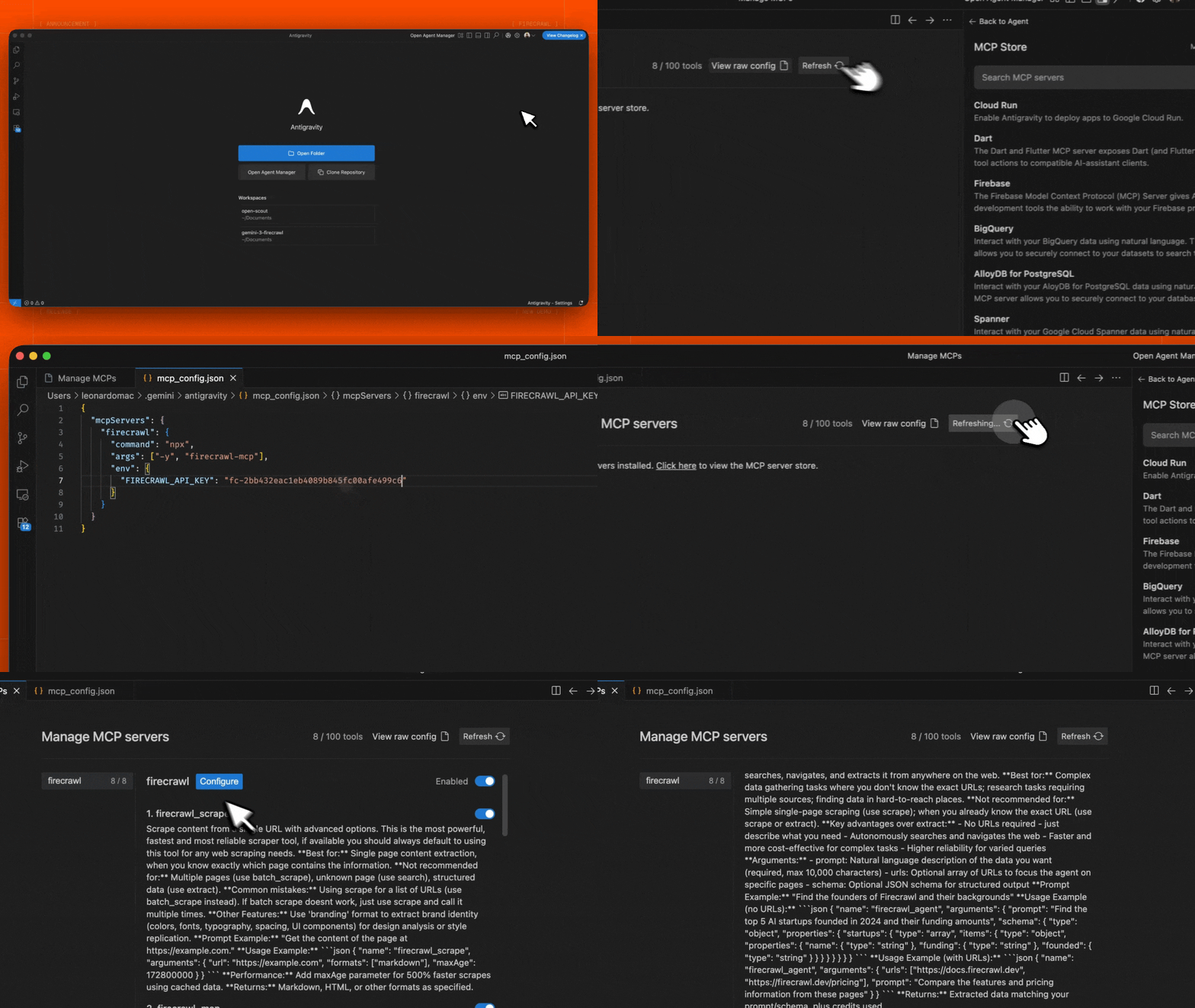
Google Antigravity 允许你直接通过其 Agent 界面配置 MCP 服务器。 Antigravity MCP 安装
  1. 在 Editor 或 Agent Manager 视图中打开 Agent 侧边栏
  2. 点击 ”…”(More Actions 更多操作)菜单并选择 MCP Servers
  3. 选择 View raw config 以打开本地的 mcp_config.json 文件
  4. 添加以下配置:
{
  "mcpServers": {
    "firecrawl": {
      "command": "npx",
      "args": ["-y", "firecrawl-mcp"],
      "env": {
        "FIRECRAWL_API_KEY": "YOUR_FIRECRAWL_API_KEY"
      }
    }
  }
}
  1. 保存文件,然后在 Antigravity MCP 界面中点击 Refresh 以查看新工具。
YOUR_FIRECRAWL_API_KEY 替换为你在 https://firecrawl.dev/app/api-keys 获取的 API key。

在 n8n 中运行

要在 n8n 中连接 Firecrawl MCP 服务器:
  1. https://firecrawl.dev/app/api-keys 获取你的 Firecrawl API 密钥
  2. 在你的 n8n 工作流中,添加一个 AI Agent 节点
  3. 在 AI Agent 配置中,添加一个新的 Tool
  4. 将工具类型选择为 MCP Client Tool
  5. 输入 MCP 服务器 Endpoint(将 {YOUR_FIRECRAWL_API_KEY} 替换为你的实际 API 密钥):
  https://mcp.firecrawl.dev/{YOUR_FIRECRAWL_API_KEY}/v2/mcp
  1. Server Transport 设置为 HTTP Streamable
  2. Authentication 设置为 None
  3. Tools to include 中,你可以选择 AllSelectedAll Except —— 这会提供对 Firecrawl 工具(scrape、crawl、map、search、extract 等)的访问
对于自托管部署,使用 npx 运行 MCP 服务器,并启用 HTTP 传输模式:
env HTTP_STREAMABLE_SERVER=true \
    FIRECRAWL_API_KEY=fc-YOUR_API_KEY \
    FIRECRAWL_API_URL=YOUR_FIRECRAWL_INSTANCE \
    npx -y firecrawl-mcp
这会在 http://localhost:3000/v2/mcp 上启动服务器,你可以在 n8n 工作流中将其用作端点(Endpoint)。需要设置环境变量 HTTP_STREAMABLE_SERVER=true,因为 n8n 需要使用 HTTP 传输。

配置

环境变量

云端 API 必需

  • FIRECRAWL_API_KEY:你的 Firecrawl API 密钥
    • 使用云端 API(默认)时必需
    • 在使用并配置了 FIRECRAWL_API_URL 的自托管实例时可选
  • FIRECRAWL_API_URL(可选):自托管实例的自定义 API 端点
    • 示例:https://firecrawl.your-domain.com
    • 如未提供,将使用云端 API(需要提供 API 密钥)

可选配置

重试配置
  • FIRECRAWL_RETRY_MAX_ATTEMPTS: 最大重试次数(默认:3)
  • FIRECRAWL_RETRY_INITIAL_DELAY: 首次重试前的初始延迟(单位:毫秒,默认:1000)
  • FIRECRAWL_RETRY_MAX_DELAY: 各次重试之间的最大延迟(单位:毫秒,默认:10000)
  • FIRECRAWL_RETRY_BACKOFF_FACTOR: 指数退避系数(默认:2)
额度使用监控
  • FIRECRAWL_CREDIT_WARNING_THRESHOLD: 额度使用警告阈值(默认值:1000)
  • FIRECRAWL_CREDIT_CRITICAL_THRESHOLD: 额度使用临界阈值(默认值:100)

配置示例

用于云端 API 的自定义重试与额度监控:
# 云端 API 必需
export FIRECRAWL_API_KEY=your-api-key

# 可选的重试配置
export FIRECRAWL_RETRY_MAX_ATTEMPTS=5        # 提高最大重试次数
export FIRECRAWL_RETRY_INITIAL_DELAY=2000    # 初始延迟 2 秒
export FIRECRAWL_RETRY_MAX_DELAY=30000       # 最长延迟 30 秒
export FIRECRAWL_RETRY_BACKOFF_FACTOR=3      # 更激进的退避策略

# 可选的额度监控
export FIRECRAWL_CREDIT_WARNING_THRESHOLD=2000    # 配额 2000 时预警
export FIRECRAWL_CREDIT_CRITICAL_THRESHOLD=500    # 配额 500 时严重警报
自托管实例:
# 自托管必需
export FIRECRAWL_API_URL=https://firecrawl.your-domain.com

# 自托管的可选身份验证
export FIRECRAWL_API_KEY=your-api-key  # 如果你的实例需要身份验证

# 自定义重试配置
export FIRECRAWL_RETRY_MAX_ATTEMPTS=10
export FIRECRAWL_RETRY_INITIAL_DELAY=500     # 以更短的间隔开始重试

在 Claude Desktop 中进行自定义配置

将以下内容添加到你的 claude_desktop_config.json 中:
{
  "mcpServers": {
    "mcp-server-firecrawl": {
      "command": "npx",
      "args": ["-y", "firecrawl-mcp"],
      "env": {
        "FIRECRAWL_API_KEY": "YOUR_API_KEY_HERE",

        "FIRECRAWL_RETRY_MAX_ATTEMPTS": "5",
        "FIRECRAWL_RETRY_INITIAL_DELAY": "2000",
        "FIRECRAWL_RETRY_MAX_DELAY": "30000",
        "FIRECRAWL_RETRY_BACKOFF_FACTOR": "3",

        "FIRECRAWL_CREDIT_WARNING_THRESHOLD": "2000",
        "FIRECRAWL_CREDIT_CRITICAL_THRESHOLD": "500"
      }
    }
  }
}

系统配置

服务器包含多个可配置参数,可通过环境变量进行设置。若未配置,将使用以下默认值:
const CONFIG = {
  retry: {
    maxAttempts: 3, // Number of retry attempts for rate-limited requests
    initialDelay: 1000, // Initial delay before first retry (in milliseconds)
    maxDelay: 10000, // Maximum delay between retries (in milliseconds)
    backoffFactor: 2, // Multiplier for exponential backoff
  },
  credit: {
    warningThreshold: 1000, // Warn when credit usage reaches this level
    criticalThreshold: 100, // 额度使用达到此级别时发出严重警报
  },
};
这些配置用于控制:
  1. 重试行为
    • 在因速率限制导致请求失败时自动重试
    • 使用指数退避以避免对 API 施加过大压力
    • 示例:在默认设置下,重试会按如下时间进行:
      • 第 1 次重试:延迟 1 秒
      • 第 2 次重试:延迟 2 秒
      • 第 3 次重试:延迟 4 秒(但不会超过 maxDelay)
  2. 额度使用监控
    • 跟踪云端 API 使用时的额度消耗
    • 在达到指定阈值时发出警告
    • 帮助避免意外的服务中断
    • 示例:在默认设置下:
      • 当剩余 1000 点额度时发出警告
      • 当剩余 100 点额度时发出关键告警

限流与批处理

服务器利用 Firecrawl 内置的限流和批处理能力:
  • 通过指数退避策略自动处理限流
  • 面向批量操作的高效并行处理
  • 智能请求排队与限流
  • 对瞬时错误自动重试

可用的工具

1. Scrape 工具(firecrawl_scrape

使用高级选项从单个 URL 提取内容。
{
  "name": "firecrawl_scrape",
  "arguments": {
    "url": "https://example.com",
    "formats": ["markdown"],
    "onlyMainContent": true,
    "waitFor": 1000,
    "timeout": 30000,
    "mobile": false,
    "includeTags": ["article", "main"],
    "excludeTags": ["nav", "footer"],
    "skipTlsVerification": false
  }
}

2. 批量抓取工具 (firecrawl_batch_scrape)

使用内置的限流与并行处理能力,高效抓取多个 URL。
{
  "name": "firecrawl_batch_scrape",
  "arguments": {
    "urls": ["https://example1.com", "https://example2.com"],
    "options": {
      "formats": ["markdown"],
      "onlyMainContent": true
    }
  }
}
响应中会包含一个用于检查状态的操作 ID:
{
  "content": [
    {
      "type": "text",
      "text": "批量操作已加入队列,ID:batch_1。使用 firecrawl_check_batch_status 查看进度。"
    }
  ],
  "isError": false
}

3. 检查批次状态 (firecrawl_check_batch_status)

检查批次操作的状态。
{
  "name": "firecrawl_check_batch_status",
  "arguments": {
    "id": "batch_1"
  }
}

4. Map Tool (firecrawl_map)

对网站进行映射,以发现站点上所有已收录的 URL。
{
  "name": "firecrawl_map",
  "arguments": {
    "url": "https://example.com",
    "search": "blog",
    "sitemap": "include",
    "includeSubdomains": false,
    "limit": 100,
    "ignoreQueryParameters": true
  }
}

Map 工具选项:

  • url: 要映射的网站基础 URL
  • search: 可选搜索词,用于过滤 URL
  • sitemap: 控制 sitemap 的使用方式 —— “include”、“skip” 或 “only”
  • includeSubdomains: 映射时是否包含子域名
  • limit: 要返回的 URL 最大数量
  • ignoreQueryParameters: 映射时是否忽略查询参数
最佳用途: 在决定抓取哪些页面之前先发现网站上的 URL;查找网站的特定区域。 返回值: 在网站上发现的 URL 数组。 在网络上进行搜索,并可选地从搜索结果中提取内容。
{
  "name": "firecrawl_search",
  "arguments": {
    "query": "您的搜索查询",
    "limit": 5,
    "lang": "en",
    "country": "us",
    "scrapeOptions": {
      "formats": ["markdown"],
      "onlyMainContent": true
    }
  }
}

6. Crawl Tool (firecrawl_crawl)

使用高级选项启动一次异步爬取。
{
  "name": "firecrawl_crawl",
  "arguments": {
    "url": "https://example.com",
    "maxDepth": 2,
    "limit": 100,
    "allowExternalLinks": false,
    "deduplicateSimilarURLs": true
  }
}

7. 检查爬取状态 (firecrawl_check_crawl_status)

检查爬取任务的状态。
{
  "name": "firecrawl_check_crawl_status",
  "arguments": {
    "id": "550e8400-e29b-41d4-a716-446655440000"
  }
}
返回: 抓取任务的状态和进度,如有则包含结果。

8. 提取工具 (firecrawl_extract)

利用 LLM 能力从网页中提取结构化数据,同时支持云端 AI 和自托管 LLM 的提取。
{
  "name": "firecrawl_extract",
  "arguments": {
    "urls": ["https://example.com/page1", "https://example.com/page2"],
    "prompt": "Extract product information including name, price, and description",
    "systemPrompt": "You are a helpful assistant that extracts product information",
    "schema": {
      "type": "object",
      "properties": {
        "name": { "type": "string" },
        "price": { "type": "number" },
        "description": { "type": "string" }
      },
      "required": ["name", "price"]
    },
    "allowExternalLinks": false,
    "enableWebSearch": false,
    "includeSubdomains": false
  }
}
响应示例:
{
  "content": [
    {
      "type": "text",
      "text": {
        "name": "Example Product",
        "price": 99.99,
        "description": "This is an example product description"
      }
    }
  ],
  "isError": false
}

Extract 工具选项:

  • urls: 要从中提取信息的 URL 数组
  • prompt: 用于 LLM 提取的自定义提示词
  • systemPrompt: 用于指导 LLM 的系统提示词
  • schema: 用于结构化数据提取的 JSON schema
  • allowExternalLinks: 是否允许从外部链接提取
  • enableWebSearch: 是否启用 Web 搜索以获取额外上下文
  • includeSubdomains: 提取时是否包含子域名
在使用自托管实例时,提取将使用你配置的 LLM。对于云端 API,则会使用 Firecrawl 托管的 LLM 服务。

日志系统

服务器提供全面的日志记录:
  • 操作状态与进度
  • 性能指标
  • 额度使用监控
  • 速率限制跟踪
  • 错误情况
示例日志消息:
[INFO] Firecrawl MCP 服务器初始化成功
[INFO] 开始抓取 URL:https://example.com
[INFO] 批处理已入队,ID:batch_1
[WARNING] 额度使用已达到警戒阈值
[ERROR] 超出速率限制,2 秒后重试…

错误处理

服务器提供完善的错误处理能力:
  • 对临时性错误进行自动重试
  • 带退避策略的限流处理
  • 详细的错误信息
  • 额度使用预警
  • 网络健壮性
示例错误响应:
{
  "content": [
    {
      "type": "text",
      "text": "错误:超出速率限制。2 秒后重试..."
    }
  ],
  "isError": true
}

开发

# 安装依赖项
npm install

# 构建项目
npm run build

# 运行测试
npm test

参与贡献

  1. Fork 本仓库
  2. 创建你的功能分支
  3. 运行测试:npm test
  4. 提交一个 Pull Request

致谢贡献者

感谢 @vrknetha@cawstudios 完成初始实现! 感谢 MCP.so 和 Klavis AI 提供托管支持,亦感谢 @gstarwd@xiangkaiz@zihaolin96 集成我们的服务器。

许可

MIT 许可 — 详情请查看 LICENSE 文件